

 KSh KES


Description
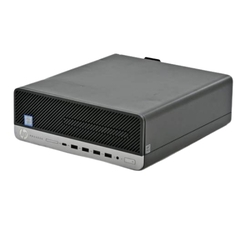
The HP Z240 Intel Core i5 processor is a compact and reliable workstation designed for professional use, offering powerful performance for tasks like 3D modeling, video editing, CAD, and other demanding applications. Below are the key specifications and details for the HP Z240 Intel Core i5 processor: hp z240 sff
Key Specifications:
- Processor:
- Intel Core i5 (6th Generation) options, such as:
- Memory (RAM):
- 4GB to 32GB DDR4 ECC or non-ECC, depending on configuration.
- Four DIMM slots available for memory upgrades.
- Storage:
- Hard Disk Drive (HDD): 500GB to 1TB (7200 RPM).
- Solid-State Drive (SSD): Optional configurations available.
- Supports multiple drives (HDD or SSD) for expanded storage.
- Graphics:
- Integrated Intel HD Graphics 4600.
- Optional discrete graphics cards (e.g., NVIDIA Quadro or AMD FirePro) for professional applications.
- Connectivity:
- USB Ports: 4 x USB 3.0, 6 x USB 2.0.
- Display Outputs: VGA, DisplayPort.
- Ethernet: Gigabit Ethernet (RJ45).
- Audio: Integrated Realtek HD Audio with front and rear ports.
- Expansion Options:
- PCIe x16 slot (for graphics cards).
- PCIe x1 slots and PCI slots for additional components (e.g., Wi-Fi, sound cards).
- Optical drive bay for a DVD-RW or Blu-ray drive.
- Operating System:
- Originally shipped with Windows 7, 8, or 10 Professional.
- Compatible with Windows 10 Pro and many Linux distributions.
- Form Factor:
- Available in two configurations:
- Tower: Larger chassis for easier upgrades and more expansion options.
- Small Form Factor (SFF): Compact design for space-saving setups.
- Available in two configurations:
Performance of Hp Z240 Intel Core i5 processor:
- Designed for professionals in architecture, engineering, graphic design, and more.
- Optimized for multitasking and running professional applications like AutoCAD, Adobe Creative Suite, and SolidWorks.
Upgrades:
- Memory: Expand up to 32GB DDR4 for improved performance in multitasking and large applications.
- Storage:
- Add an SSD for faster boot times and application loading.
- Configure multiple drives for RAID setups.
- Graphics:
- Upgrade to a professional graphics card (e.g., NVIDIA Quadro or AMD Radeon Pro) for better performance in 3D and CAD applications.
- Cooling: Add or replace cooling solutions for better thermal performance in intensive workflows.
Use Cases:
- Creative Professionals: Video editing, photo editing and 3D modeling.
- Engineers and Architects: Running CAD software like AutoCAD, Revit or SolidWorks.
- Business Use: High-performance workstation for productivity and multitasking. hp z240 sff
Would you like assistance with specific upgrades, troubleshooting, or available stock for the HP Z240 at Takashi Limited?
Our Facebook Page
Reviews
There are no reviews yet.