

 KSh KES


Description
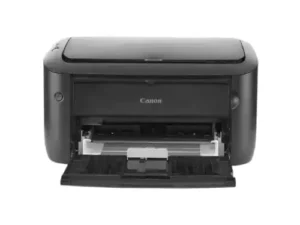
The Canon i-SENSYS MF3010 3-in-1 Printer is a popular choice. It’s an affordable monochrome laser printer. This multifunction device is versatile. It suits home offices. Small businesses also find it useful. It prints, copies, and scans documents.
Key Features Overview
This printer offers essential functions. Print, copy, and scan are all included. It is a compact device. Its small footprint saves space. It fits easily on any desktop. An intuitive vertical display simplifies use. Controls are very easy to operate.
Speed and Efficiency
It boasts fast printing speeds. The first print appears quickly. It takes just 7.8 seconds. Print speed reaches 18 pages per minute. This ensures quick document handling. The MF3010 is energy efficient. It is Energy Star compliant. This helps reduce electricity costs.
High-Quality Output
Printing delivers sharp text. Graphics appear clear. Print resolution reaches 1200 x 600 dpi. Copies also maintain quality. Copy resolution is 600 x 600 dpi. Scans are detailed and precise. Optical scan resolution is 600 x 600 dpi. Enhanced resolution reaches 9600 x 9600 dpi.
Technical Specifications
This is a monochrome laser printer. Print speed is 18 ppm (A4). Copy speed matches at 18 ppm (A4). Paper input capacity is 150 sheets. Connectivity relies on USB 2.0. It works with Windows and Mac.
Advantages and Disadvantages
The price is very affordable. Its compact size saves space.It is incredibly easy to use. Printing speed is notably fast. It also proves energy efficient. However, it prints only in black and white. There is no network connectivity. It only uses USB. Paper capacity is somewhat limited.
Overall Assessment
The Canon i-SENSYS MF3010 is reliable. It is a cost-effective choice. It handles basic print needs. Copying and scanning are simple. It’s great for individuals. Small offices also benefit. It suits those not needing color. Advanced features are absent.
Availability and Purchase
You can find this 3-in-1 Printer easily. Various online retailers stock it. Electronics stores also sell it. Check local online marketplaces in Nairobi. Local computer stores are also good options. Always compare prices carefully. Look for available deals or bundles. Ensure you get the best value. This printer offers solid performance. It is a practical solution.
Our Facebook Page
Reviews
There are no reviews yet.