

 KSh KES


Description
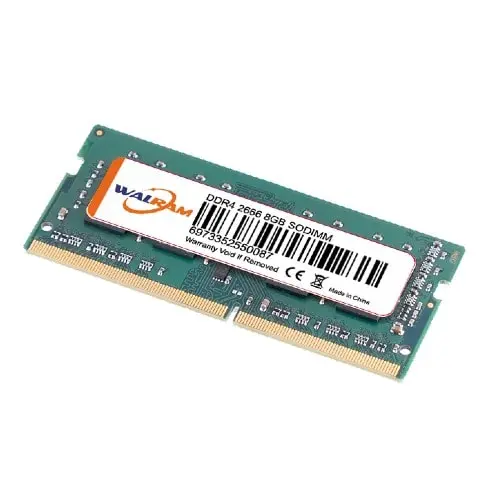
8GB DDR4 3200MHz Laptop RAM or DDR4 3200MHz RAM is a popular choice for upgrading or replacing memory in laptops, offering a balance of speed, capacity, and energy efficiency. DDR4 SODIMM:
Key Features of 8GB DDR4 3200MHz Laptop :
- Type:
- DDR4 SDRAM: The fourth generation of DDR memory, providing faster speeds and greater energy efficiency compared to DDR3.
- Capacity:
- 8GB ram: Ideal for everyday computing, multitasking, moderate gaming, and light content creation.
- Speed:
- 3200MHz (PC4-25600): A high-speed option for smoother performance in memory-intensive tasks like video editing, gaming, or running virtual machines.
- Voltage:
- Operates at 1.2V, making it energy-efficient and suitable for laptops.
- Form Factor:
- SO-DIMM (Small Outline Dual Inline Memory Module): Compact design specifically for laptops and mini PCs.
- Compatibility:
- Supports systems with DDR4 SO-DIMM slots and a compatible CPU/motherboard.
- Check your laptop’s maximum supported speed (e.g., 2400MHz or 2666MHz systems may downclock 3200MHz RAM).
- Latency:
- Typical latency is CL22, which affects response time and overall performance.
Benefits of 8GB DDR4 3200MHz Laptop :
- Performance Boost:
- Increases multitasking capability, making switching between applications seamless.
- Reduces load times for apps and games.
- Energy Efficiency:
- Lower power consumption extends battery life in laptops.
- Future-Proofing:
- Compatible with modern laptops, providing ample capacity for upcoming software updates.
- Easy Upgrade:
- Adding or replacing laptop 8GB ram is one of the simplest hardware upgrades to improve performance.
Installation Process of DDR4 SODIMM:
- Check Compatibility:
- Confirm your laptop supports DDR4 3200MHz SO-DIMM and can handle an 8GB ram ram module.
- Consult your laptop’s manual for maximum RAM capacity and slot configuration.
- Physical Installation:
- Power off the laptop and disconnect from the power source.
- Open the back panel or RAM compartment.
- Remove the old module (if replacing) by releasing the clips on each side.
- Insert the new 8GB DDR4 module at an angle, ensuring the notch aligns with the slot.
- Press down gently until the clips snap into place.
- Verify Installation:
- Boot up the laptop and check the installed RAM in the system settings or BIOS.
Leading Brands of DDR4 SODIMM:
- Corsair Vengeance:
- High-performance RAM with reliable build quality.
- Crucial (by Micron):
- Known for compatibility and affordability.
- Kingston:
- Offers a range of reliable laptop RAM options, including the popular Kingston Fury Impact series.
- Samsung:
- Trusted for original and OEM-grade memory modules.
- TeamGroup & ADATA:
- Affordable alternatives with solid performance.
Considerations of DDR4 3200MHz RAM:
- Dual-Channel Configuration:
- For better performance, use two identical RAM modules (e.g., 2x8GB ram for 16GB) to enable dual-channel memory.
- Warranty:
- Most laptop RAM comes with a lifetime warranty.
- Cost:
- DDR4 3200MHz SO-DIMM modules are reasonably priced, providing excellent value for their performance.
If you need any help with installation of 8GB ram, compatibility checks, or other considerations, feel free to ask!
Reviews
There are no reviews yet.