

 KSh KES


Description
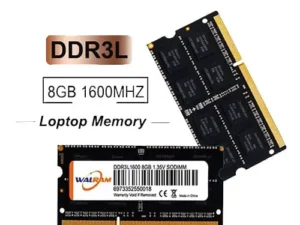
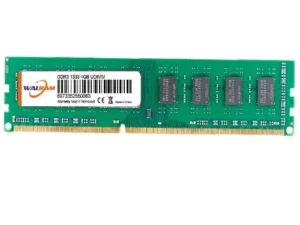
An 8GB DDR3 1333MHz Laptop RAM/8GB DDR3 10600mhz or 1333MHz Laptop RAM or Laptop DDR3 SODIMM 8GB ram is a great upgrade option. It offers solid performance for many users. While DDR3 is older, it still performs well. It handles web Browse easily. Office productivity also runs smoothly. Media consumption is a breeze.
Key Features of this Laptop RAM
This memory is DDR3 SDRAM. It’s the previous generation before DDR4. DDR3 has lower speeds. It uses more power than DDR4. However, it’s very reliable. Many older laptops support it.
The capacity is 8GB. This is the modern minimum for laptops. It provides enough memory for multitasking. You can run multiple apps. It handles moderately demanding tasks. Video editing and light gaming work well. It balances performance and cost.
The speed is 1333MHz (PC3-10600). This speed is lower than newer standards. Newer RAM runs at 1600MHz or more. Still, 1333MHz suits basic tasks. It works for intermediate tasks too. Older laptops often only support this speed. This RAM offers best compatibility for them.
It operates at 1.5V. DDR4 uses a lower 1.2V. This means slightly higher power use. However, its impact on battery life is small. Heat generation is also minimal. Older systems expect this voltage.
The form factor is SO-DIMM. This stands for Small Outline Dual Inline Memory Module. SO-DIMM is compact. It fits laptop spaces perfectly.
CAS Latency (CL) is typically CL9 or CL11. This varies by manufacturer. Latency affects performance slightly. It matters more in memory-intensive tasks. Everyday use shows little difference.
Compatibility
This 8GB DDR3 1333MHz RAM is ideal. It works with laptops supporting DDR3. The laptop must operate at 1333MHz speeds. Always check your laptop’s specifications. Ensure it supports 8GB DDR3 RAM. Some older laptops may have limits. They might support only 4GB or 6GB.
Benefits of this RAM
Improved multitasking is a big plus. 8GB RAM handles many applications easily. You can open many browser tabs. Office software like Word, Excel, or PowerPoint run well. Some media editing software also works. You will see no slowdowns.
It is sufficient for moderate gaming. Light and older games run well. Examples include Minecraft or League of Legends. For newer games, CPU or GPU might limit. RAM is less often the bottleneck.
It offers enhanced productivity for work. Photo editing software like Photoshop performs well. Video editing with Premiere Pro also works. 8GB manages small projects. You avoid significant lag. System freezes are less likely.
It provides increased system responsiveness. Applications launch faster. Loading times are reduced significantly. This is true compared to 4GB systems.
Ideal Use Cases
This RAM is great for web Browse and productivity. It handles everyday tasks smoothly. Email and productivity software run well. You can keep several apps open. It’s perfect for multitaskers.
It excels in media consumption and streaming. HD videos play smoothly. YouTube streaming is seamless. Your media experience improves greatly.
For office work, it is perfect. Microsoft Office suites run easily. Large spreadsheets or presentations perform well. Documents with many elements are handled.
It’s good for light gaming. Casual and older games perform well. It may not run the latest AAA games. But less demanding titles work perfectly.
Basic software development and coding benefit. Code editors like Visual Studio Code run fine. Small to medium-sized projects work well. Larger projects might need more memory.
Virtualization (light workloads) is possible. 8GB runs 1-2 virtual machines. This suits basic testing or development. Multiple VMs may struggle. Resource-heavy tasks also may.
Installation Process
First, check compatibility. Ensure your laptop supports DDR3. Verify it handles 8GB modules. Confirm maximum memory capacity.
Next, install the RAM. Turn off your laptop. Disconnect power sources. Remove the back panel. Access the memory slots. Insert the 8GB DDR3 1333MHz module. Make sure it clicks into place. Reassemble the laptop. Reconnect the battery.
Finally, verify installation. Boot up your laptop. Check system information. Windows users check Task Manager. Mac users use System Information.
Leading Brands
Corsair Vengeance is known for performance. It offers high-quality memory. It suits gaming and productivity.
Kingston HyperX provides high speed. It is reliable with great support. Compatibility is excellent for most laptops.
Crucial Ballistix offers good performance. It’s an affordable choice. Crucial is a trusted brand.
Patriot Signature delivers affordable reliability. These modules are great for general use. They provide good value.
G.Skill Ripjaws is a solid choice. It offers high performance and reliability. Prices are competitive.
Important Considerations
For a dual-channel setup, consider two 4GB modules. This might offer better performance. It helps with memory-intensive tasks. Gaming or video editing benefit greatly.
Consider your upgrade path. If your laptop supports higher speeds, choose them. 1600MHz or 1866MHz offers boosts. Ensure your motherboard and CPU support higher speeds.
Heat and power consumption are factors. DDR3 at 1.5V uses more power. This has a small battery life impact. It might affect less power-efficient laptops.
Conclusion
The 8GB DDR3 1333MHz Laptop RAM/8GB DDR3 10600mhz is an excellent choice. It provides a solid memory upgrade. It has enough capacity for multitasking. Moderate gaming and office work run smoothly. Light software development is also possible. It is slower and less power-efficient than DDR4.However, it’s cost-effective and reliable. It suits laptops not supporting DDR4.
Need more information? Ask about installation. Inquire about compatibility. Feel free to ask any other questions!
Our Facebook Page


Reviews
There are no reviews yet.